Surplus Funds AI Assistant
Ask. Ivy does the rest.
Ivy is the AI agent for surplus funds recovery, built into Surplus Funds. It drafts, sends, files, and follows up on your cases. You approve what goes out.
Ivy is AI and can make mistakes. Double-check any legal or financial guidance before acting on it.
Multi-step workflows
Watch Ivy work.
Four real jobs, start to finish, the way they run in the app.
Ivy is AI and can make mistakes. Double-check any legal or financial guidance before acting on it.
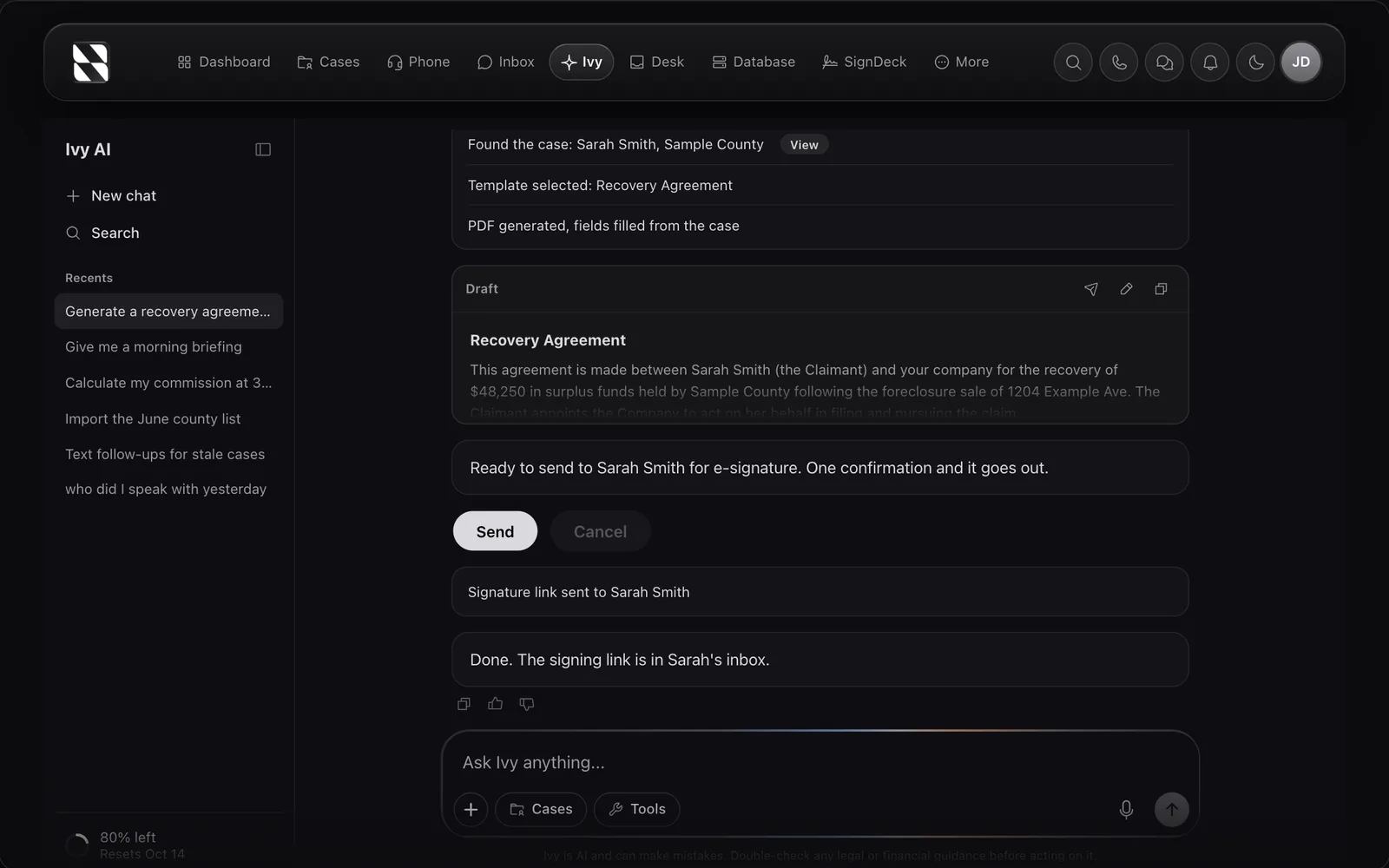
One sentence. One confirmation. The same job by hand is 15 or more clicks across 4 screens.
How it works
One sentence becomes five actions.
Ivy chains the steps. You confirm once.
By hand
15+ clicks, 4 screens
Open the case. Open documents. Pick the template. Fill the fields. Generate. Review. Send for signature.
With Ivy
1 sentence, 1 confirmation
Say what you want. Confirm the send. Done.
About 90 percent fewer steps, counted from the real document flow. Multi-step workflows bill as one credit, no matter how many steps Ivy chains.
actions Ivy can run inside your CRM, from texts to e-signatures
clicks across 4 screens becomes one sentence on the document flow
confirmation before anything leaves your account
Capabilities
32 actions. Four jobs.
Every action runs inside your CRM, on your real case data.
- Send textsIvy drafts, you approve, it sends from your number.
- Send emailsWritten from the case, sent from your connected inbox. Gmail Microsoft
- Start sequencesEnroll a contact in a drip with one ask.
- Generate documentsTemplates filled with case data, out as PDFs.
- Send for e-signatureSignature links go out by email, tracked.
- Read case filesIvy pulls answers out of uploaded documents.
- Create tasksFollow-ups with real due dates, from plain English.
- Move casesStatus changes, one case or in bulk, always confirmed.
- Start callsThe browser dialer opens with the right number.
- Morning briefingPipeline, stale cases, and overdue tasks in one screen.
- Case analysisRed flags, next steps, and a commission estimate.
- Commission mathGross surplus, your cut, and net to client.
12 shown here. 32 registered actions in total.
Control
Nothing sends without you.
Ivy moves fast and stops at the edge. The last step is always yours.
Confirmation gates
Every text, email, call, signature request, and status change stops for your approval before it happens.
Voice input
Tap the mic and talk. Ivy types, you review, nothing sends itself.
Case context
Open a case and Ivy already knows which one you mean. No repeating yourself.
This stop is built in. It cannot be turned off.
Privacy
Your surplus funds data stays yours.
Ivy reads the case you ask about to give better answers. Beyond that, your cases, calls, and documents stay yours alone.
Never trains models
Your case data is never used to train underlying models or shared with any model provider for improvement.
Never shared
Your data is isolated to your organization. It is never shared with other accounts or sold to third parties.
Private by default
Only people you invite to your workspace can see your cases, call logs, documents, and Ivy conversations.
Yours to delete
Request deletion of your data at any time. See our Privacy Policy for the full list of data rights.
Screenshot
One plan.
Every tool.
Twelve tools for surplus funds recovery in one workspace, instead of a subscription for each.
Starting from
Starting from 99 dollars a month
Includes
- CRM & Pipeline
- Power Dialer
- SMS Campaigns
- Email Outreach
- Direct Mail
- E-Signatures
- Meeting Scheduling
- Website Forms
- AI Assistant
- Property Research
- Skip Tracing
- Team Leaderboard
Month to month, cancel anytime. Calls, texts, postage, skip traces and property searches are paid as you use them.
Ivy, answered.
Ivy is the AI agent built directly into the Surplus Funds CRM. She understands surplus funds terminology and recovery workflows, and she can take action: 32 registered actions from sending texts to generating e-signature paperwork. Think of her as a teammate available 24/7, inside the same tool where you run your pipeline.
Yes. Ask for a recovery agreement and Ivy chains the steps: it searches the case, picks the template, generates the PDF, and queues it for e-signature. You confirm once before it sends, and the whole workflow bills as one credit no matter how many steps it takes.
ChatGPT is a general-purpose assistant. It does not know what a surplus funds fee agreement looks like, does not understand your pipeline, and cannot take action on your cases. Ivy operates inside your CRM with 32 registered actions: she reads case data, drafts and sends texts and emails, generates documents, and moves cases through your pipeline. Every outbound action stops for your confirmation.
Every paid plan includes monthly Ivy usage, shown in the app as a simple multiple. CRM Only and Starter include 1x usage per month, Nationwide includes 3x, and Reserve includes 8x. One 1x is roughly a month of steady use. Your workspace shows a live bar of how much is left and the date it resets, so there is never a guess. Included usage resets on the 1st and does not roll over. If you want more, you can add usage at any time and what you add never expires.
Yes. When you ask Ivy about a case, she can pull the contact information, call history, text history, documents, and notes from that case to give a more relevant response. She never shares your data with other accounts and never uses your data to train underlying models.
Yes. Ivy runs inside the Surplus Funds web app, which works on desktop, laptop, tablet, and phone. You can ask Ivy for a case summary from your phone between calls, draft an outreach letter from a tablet, or send a document from your laptop at the office.
No. Ivy is designed to answer natural questions like "summarize this case" or "draft an outreach letter for this claimant". You do not need to know anything about AI or prompting. Just ask.
Put Ivy on your pipeline.
Ivy ships with every paid Surplus Funds plan. Starter includes 1× usage every month, Nationwide 3×, Reserve 8×. You can see exactly how much is left, any time.